Pages

Sunday, 28 February 2010

Graduates and Failures In Gmail Labs


Gmail was recently voted the best Email Client over at Lifehacker. Part of the reason for it's success is its growing set of features known as Gmail labs. There are now over 60 features and some of these have been quite useful (Google Docs Preview), others not useful (Back to Beta), and others quite fun (Old Snakey). This week the Gmail team graduated 6 of these; Search Autocomplete, Go To Label, Forgotten Attachment Detector, YouTube Previews, Custom Label Colors, and Vacation Dates. Those that have been officially cut from the lineup are; Muzzle, Fixed Width Font, Email Addict, Location in Signature, and Random Signature.

    My favorite two graduates are Search Autocomplete and Forgotten Attachment Detector. As your typing in the search box, Gmail suggests search terms; it looks and works just like a normal Google search. With Forgotten Attachment detector, Gmail scans your message for keywords indicating an attachment (i.e., "attached"). If the send button is clicked and no attachment is present, a warning message will appear.

    Gmail has evolved significantly since the early days when it was invitation only. Labs has and will continue to accelerate this evolution. 


    Thursday, 25 February 2010

    Ubuntu: A Great Change For A Windows User

    Recently I enjoyed the wonderful experience of the Ubuntu operating system. This happened accidentally as my home computer died, and I was given a loaner computer with no installed OS. Since I didn't want to spend any money, I decided with the free, user-frinedly, and open-source Ubuntu.


    Installing Ubuntu was very easy, anyone that knows how to insert a CD and click a mouse can do it.


    Getting used to ubuntu terminology and organization took some time and I'm still trying to get used to it. Anyways, below are the things that I really like about Ubuntu, and beneath that is a list of what still needs to be worked on:


    What I really like:
    1. Low RAM Usage: I have used Windows for 10 years and had though that every machine needed 4 GB of RAM and that an idling OS would use at least 700 MB. Boy was I surprised when I checked the system monitor in Ubuntu. I had Chrome, Google Earth, and FireFox running, and I was only using 400 MB of RAM. Unbelievable!!
    2. Custom Desktop Experience: Icons can be easily added to the tray, they can also be enlarged/reduced, and with CompizConfig windows can be grouped, previewed, snapped to a grid and so on. By far the coolest effect is the 3D desktop.
    3. Sharp Graphics/Fonts: I love the default fonts and the graphics seem to have a sharper look than Windows.
    4. Menu Organization: Another great feature is the grouping of programs. For example, all Internet apps are placed together so there is no need to search through a large menu for a particular program.
    5. Its Open Source: This means constant evolution. The Ubuntu team has stated that it will release a new version of its OS every six months. As a Windows person I had thought that an OS could only be updated about every 2-3 years, now I am wondering what all of those high paid engineers are doing as Microsoft.
    6. No Viruses: Its so nice not having to worry about some trojan or nasty piece of code destroying my machine and files. Now I truly understand what the Mac people have been boasting about for years. 
    What Needs To Be Worked On:
    1. Codecs: Ubuntu comes with some media players and there are a bunch of free ones to download. The problem with all of these is that they do not come with all of the codecs, and installing them wasn't as simple as downloading a file. I spent at least 3 hrs trying to get the codecs to play a illegally downloaded movie. 
    2. More User Friendly: It was very easy to get started with Ubuntu, but the installation of some programs was difficult. I love Google Earth but installing it on Ubuntu was a pain. I could not simply click on a link, download a file, and click on install. I had to search for a command and then enter it into the Ubuntu terminal, which never worked on the first three tries. 
    3. WINE: This program allows the running of Windows only programs in Ubuntu. I found this program really difficult to use and still only have it partially figured out. 
    4. iPod/iPhone management: There are millions of iPods and iPhones out there but I could not find an easy-to-use program to manage video and audio. I tried running iTunes in WINE but all I could get was errors. This is the main reason why I haven't switched completely to Ubuntu. 
    Since the 1st draft of this post I have gotten my computer back and it is working fine. I was going to buy another hard drive and change my computer to a dual-boot machine but the computer is getting old and I don't want to spend any unnessary money on it. So, I am now running Ubuntu within VMWare Player and am easily enjoying the best of both worlds. Hopefully Ubuntu can fix some of the above-mentioned mentioned issues in their next release. Living a Windows-free life may be just around the corner!!

    Tuesday, 23 February 2010

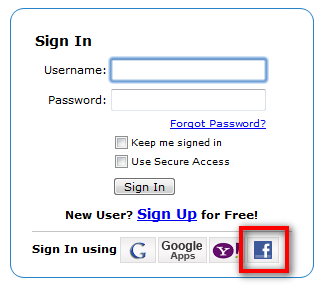
    Zoho Allows Sign-in With Facebook Connect

    Zoho is very open with sign-in options by allowing users to sign in with Google, Google Apps, or Yahoo accounts. Today they announced the biggie that users can sign-in to any of the Zoho apps with Facebook credentials. 
    Users can also share documents with all of their Facebook friends (even those without Zoho accounts) and your zoho/facebook accounts can be linked. 


    Zoho is making it so easy to use their product and this will definitely cause a huge increase in their numbers. This is truly a great feature and is a big leap forward towards an open web. Great work Team Zoho. 

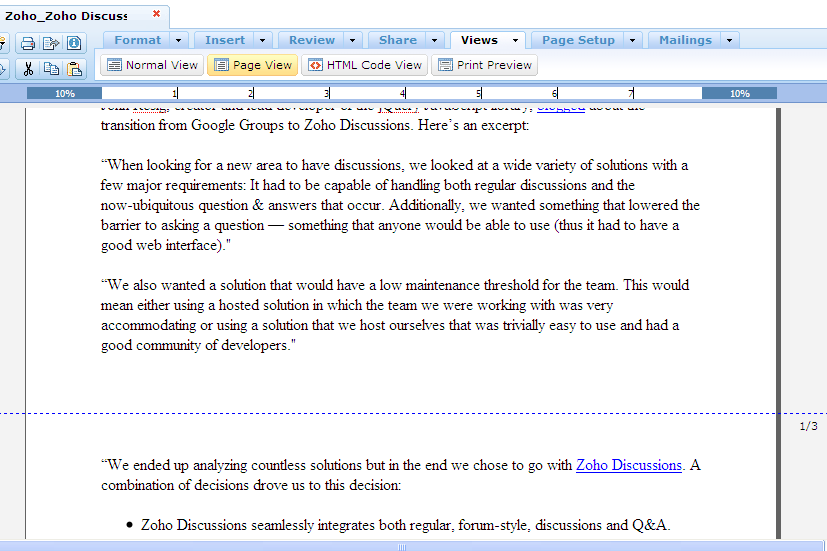
    Zoho Writer Gets Page View For Editing

    One of the basic features of desktop word processors that wasn't present in their online counterparts was page view. Page preview was available, but this would only preview the document for printing, editing could not occur. Zoho Docs now has an editable page preview (View --> Page View) that indicates page separations with a dashed line. Its a simple solution that works great.


    Monday, 22 February 2010

    Zoho Mobile Gets Refresehed On iPhone and Android


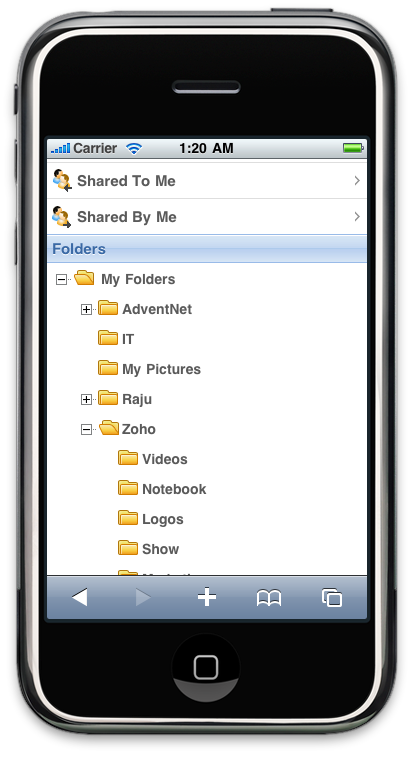
    Zoho mobile's app for android and iPhone was updated today to allow sign-in with Google, Google Apps, and Yahoo accounts (the desktop version already had this) along with a redesigned home screen, the introduction of mobile Zoho Docs that is limited to viewing documents, and some performance tweaks. All of these are great improvements, but editing of any type of mobile document would have been a game changer. I have been expecting this feature from the Google Docs team but it hasn't arrived yet. Whoever (Zoho, Google, or Microsoft) introduces this feature first will definitely cause a spike in their number of users along with a drastic change in how we use our smartphones. 

    The New Mobile Zoho

    Saturday, 20 February 2010

    Goodbye Google Gears

    Google Gears, the offline sync tool, is being pushed out the door to make way for the offline capabilities of HTML 5. This is a great move  because all of these plugins have some sort of browser-specific bug. For example, using Chrome I could not view drawings in presentation mode with Google Presentations because of a conflict with Google Gears, I could see them in FireFox. As we get rid of these plugins, developers can spend more time of evolving the the web as a whole and lest time on bug fixing.

    RIP Google Gears.


    Google Docs Gets A New Clipboard

    Recently, Microsoft posted a series of videos touting its advanced copy/paste feature compared to Google Docs. Now Google Docs has answered back with a new and improved copy/pasting that uses a web clipboard to store copied items "in the cloud" for 30 days. Prior to the introduction of this feature, Google Docs had simple copy and pasting and worked quite well for placing information from websites into a document, but not so well for copying information between Google documents, spreadsheets, and presentations. As shown in the photos below, spreadsheet data can be copied and pasted into a presentation as a table.


    There are problems with this feature though. I tried copying images from a Google document into a presentation and vice versa, it simply wouldn't work, and the feature is very browser dependent (guess which one it works best in?). Also, the fact that clipboard storage only works for Google Docs and not other websites is a major let-down. Hopefully they will keep improving this feature. 

    Powered By Blogger