Google introduced the new Google Maps at Google I/O this week. Along with a brand new shiny look it has added Earth mode (see 2:11 in video) which is a lite version of Google Earth minus the Google Earth plugin. This will run in all modern browsers and no extra software will have to be installed; I also expect more features will be added to the web app with time. For us Chromebook users, this is a must needed feature. As I have told many of future Chromebookers, cloud enthusiasts, and techies the only major thing that Chromebooks were missing was Google Earth. Here's hoping that my invite to the new Google Maps arrives soon!
Sunday, 19 May 2013
The New Google Maps
Google introduced the new Google Maps at Google I/O this week. Along with a brand new shiny look it has added Earth mode (see 2:11 in video) which is a lite version of Google Earth minus the Google Earth plugin. This will run in all modern browsers and no extra software will have to be installed; I also expect more features will be added to the web app with time. For us Chromebook users, this is a must needed feature. As I have told many of future Chromebookers, cloud enthusiasts, and techies the only major thing that Chromebooks were missing was Google Earth. Here's hoping that my invite to the new Google Maps arrives soon!


Sunday, 10 February 2013
Life With Google TV: Canadian and No Cable subscription edition
Kijiji how I love you; you gave me a $230 Sony Google TV Box (NSZGS7) for $130, unopened (it was a credit card reward for a retired teacher). I had read some good reviews about the device, and since I love Google products, it was an easy decision. The Apple TV Box was somewhat attractive, but the killer missing item is the browser, especially since all TV channel websites have video but not all have apps.
Initial setup was extremely easy, it took less than 10 minutes including spending 5 minutes trying and successfully pairing it with my Samsung 32" TV. Within 30 minutes I was extremely comfortable with the system including the remote...both sides of it.
In order to keep things short, below are some highlights of the Sony Google TV Box; Canadian Edition:
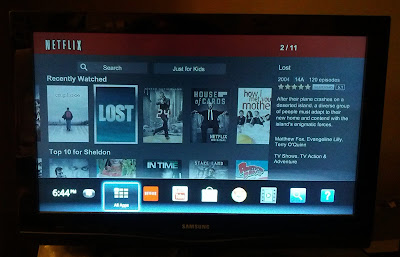
The Google TV Experience (the really bad ending to Lost is getting closer!!)
Initial setup was extremely easy, it took less than 10 minutes including spending 5 minutes trying and successfully pairing it with my Samsung 32" TV. Within 30 minutes I was extremely comfortable with the system including the remote...both sides of it.
In order to keep things short, below are some highlights of the Sony Google TV Box; Canadian Edition:
- Hardware: Not sure what the processor or RAM is, but it handles everything well with no hesitation (remember, the spec is dead). There is HDMI input/output ports, 8 GB of internal storage (about 4 GB free for apps) 2 USB ports (which I haven't used yet), optical audio output, and an Ethernet connection. The remote is well designed, possibly a bit too big since I find it a bit clumsy and I have somewhat large hands. The 2.7" clickable touchpad (touch to click also available) works fine and has edge scrolling for horizontal and vertical webpage movement, and the QWERTY keyboard which is also backlit gets the job done; occasionally the remote is unresponsive. Battery usage seems average, the include batteries are working fine and I have used the remote a lot.

The Remote: Maybe a bit large, QWERTY keyboard on the back. - Apps: There is nowhere near the selection of apps available as for an Android phone or tablet and most of the apps are pretty-much useless. Google itself has a very poor selection; there is no Google Earth, Maps, Google Plus, and so on. There are some nice streaming TV apps available, one of my favorites is TV Portal which provides a huge list of shows with appropriate links for streaming in a very nice interface. Movies are available for rent/purchase, TV shows still haven't arrived to the Great White North. Sony Video and music unlimited come pre-installed and I haven't used either yet.
- Chrome Browser: For some reason, Google TV uses version 11 of Chrome, current desktop versions are at 25!! It gets the job done, has Bookmark sync, and it has Flash Version 10 (this was a deal-breaker for me). Every website except for CityTV has allowed me to stream video, although some playback issues has been experienced with the CTV site. Chrome runs within Android 3.2, which, like the browser, gets the job done.
- Updates: This is not a Nexus device, so I wasn't expecting many updates. I received one when the system was turned on, none since. I am expecting the next will be sometime after Google I/O 2013.


The overall experience with the Sony Google TV Internet Box has been great. Prior to this I relied on my Chromebook connected via VGA to my TV, this was fine but lacked the HDMI experience and the "lying back on the couch channel surfing" experience. The box has become part of my routine; I turn it on before I eat breakfast to watch the CBC National, stream some Netflix during the evening, and explore the great unknown of TV Portal at night. When all of this gets boring, I can surf the web via the Chrome browser to update G+ and Facebook statuses, check to see when the latest snowstorm will hit Newfoundland, and look at beautiful pictues of puddy tats. If you are a user like me, one that lives on the web and dislikes Big Cable, the Sony Google TV box is highly recommended.
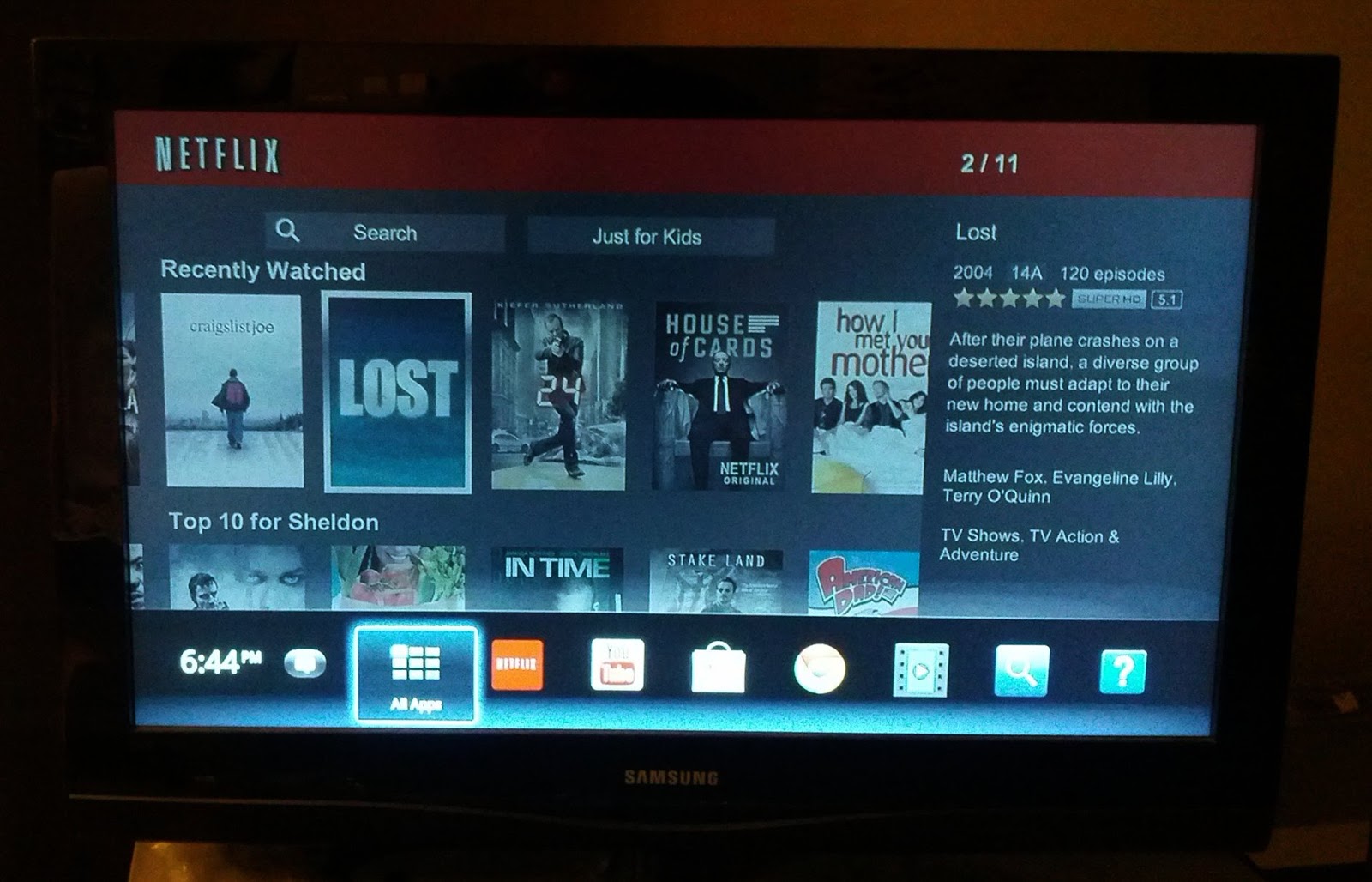
The Google TV Experience (the really bad ending to Lost is getting closer!!)
Tuesday, 11 September 2012
Codecademy: Learning Code in the Cloud
I have dabbled with coding before; I am OK with HTML, mediocre with CSS, and horrible with Javascript. All of this will hopefully change as I work through totally online and free courses through Codecademy.

If you have time and want to learn code, check out Codecademy. Its simple, free, and totally done in the cloud.

Learning in Codecademy is done via basic instructions and an online editor
Besides those mentioned above, courses on jquery and python are also available; there are also lessons built around applying this newfound knowledge, and both courses and applied lessons are continually added. The UI works is very visually pleasing, and has worked 100% of the time during my sessions.
Sunday, 9 September 2012
A Simpler Life: Chromebook Edition
I recently came across this post on Lifehacker titled "10 Simple Things Every Computer User Should Know How To Do," and I realized that life with a Chromebook is so much simpler. Here are the things from the list (and their respective numbers) that Chromebook users don't have to do:
#10: Set Up a Dead Simple Backup System: 99% of Chromebook user's is stored in the cloud, we simply let Google take care of things.
#8: Protect Yourself From Viruses: Chrome = Virus free. No worries when you are surfing those free-TV streaming sites.
#5: Access Your Home Computer From Anywhere: Again, we store most of our data in the cloud, as long as we are connected we have our files.
#4: Keep Your Computer in Tip Top Shape with Regular Maintenance: Chromebooks are constantly updated and termed the "always new" computer. I am on the Beta channel and receive updates weekly, free of charge. I own both generations of the Samsung Series 5, and both have actually gotten faster with time.
#3: Instantly Share a File Between Two Computers: All we have to do with a file is hit "share" and type in the address; simple!
These are five somewhat time consuming tasks that us Chromebook users don't have to do. We let the big G take care of everything and enjoy a much simpler computing life.
#10: Set Up a Dead Simple Backup System: 99% of Chromebook user's is stored in the cloud, we simply let Google take care of things.
#8: Protect Yourself From Viruses: Chrome = Virus free. No worries when you are surfing those free-TV streaming sites.
#5: Access Your Home Computer From Anywhere: Again, we store most of our data in the cloud, as long as we are connected we have our files.
#4: Keep Your Computer in Tip Top Shape with Regular Maintenance: Chromebooks are constantly updated and termed the "always new" computer. I am on the Beta channel and receive updates weekly, free of charge. I own both generations of the Samsung Series 5, and both have actually gotten faster with time.
#3: Instantly Share a File Between Two Computers: All we have to do with a file is hit "share" and type in the address; simple!
These are five somewhat time consuming tasks that us Chromebook users don't have to do. We let the big G take care of everything and enjoy a much simpler computing life.
Sunday, 1 April 2012
Chromebook: Future of the Enterprise and Education Realms

My Chromebook is currently on the beta channel and receives updates about every 2 weeks; this consists of clicking on "the wrench," waiting for the update to download, and then restarting, this last step takes less than 10 seconds. Overall it is a very simple and quick experience which can be easily applied to the enterprise/education realm.
At a stark contrast to this are the enterprise and education models using traditional Windows PCs (I am not sure about the Mac updating process). Usually some kind of imaging program is used, which is much more complicated than it should be, and quite often crashes during the updating process. People get frustrated, they don't have hours to waste on updating computers, this results in computers not being updated and creating statistics like this; ~25% of IE users are using IE 6 or 7! IE6 was released in 2001!
With the Chromebook model, everyone can easily have the latest and greatest browser version with ease. Say goodbye to the 11 year old operating systems and browsers.
Saturday, 25 February 2012
The Death of Point-and-Shoots

Why do I love the camera so much? Even though it is only 5 MP, it takes good photos and avoids a lot of the hassle with point-and-shoots:
- Geotagging: As long as the my phone's gps is turned on, photos are automatically geotagged, and the accuracy is pretty good. With the point-and-shoot, I have to manually add the gps information with software that often crashes.
- Uploading: Android allows easy uploading to major photo sharing sites. I am a diehard Picassa web album user, to upload I simply select the photos and the album to upload to. For the point-and-shoot, I have to transfer them to my computer via a usb cable, then upload them to Picasa web albums. I hate having to deal with wires.
- One Less Device: Back in the day I rocked a dumbphone and iPod Touch. Like a lot of people I have ditched the iPod Touch and dumbphone, and use just the smartphone. Using the smartphone as my primary camera is another step in the direction of using just one device. Before the smartphone age, people would whip out their point-and-shoot to grab a photo, take out the dumbphone to make a call; now they simply whip out their smartphone. Flickr numbers provide evidence for this, the iPhone is the most popular camera used (and yes, I admit that the iPhone does have a great camera) and I suspect other phones are playing catch-up.
Photographers out there will never move in this direction, and most probably don't use a point-and-shoot, they will stick with their SLR or DSR or whatever it is called. The average user is ditching their point and shoot for their smartphone and I expect the rate of this will increase. Instead of users upgrading their camera, they will upgrade their phone (8 MP cameras and higher are very common in smarthphones these days). I know I will be doing this come October.
Finally, here is the same beautiful Newfoundland scene taken with my Sony point-and-shoot and my Nexus S, I am not sure which device took which photo, for me and the average user it doesn't matter.
Finally, here is the same beautiful Newfoundland scene taken with my Sony point-and-shoot and my Nexus S, I am not sure which device took which photo, for me and the average user it doesn't matter.


Tuesday, 6 December 2011
Pure Android: The Way It Must Be

To be fair, the HTC sense overlay was nice, but the problem is that it took up a lot of the system resources, especially the Desire's precious internal memory, and this led to issues such as system slowdown and apps not opening. So far on my Nexus S I have all of my previous apps plus more loaded, and there has been no slowdown. The battery life is great (it lasts twice as long as the Desire), the overall look and feel is much simplier which makes finding things easier, and I am a big fan of the launcher. Finally, the camera is fantastic! Over the holidays I took most of my photos with the Nexus S, my point and shoot sat silent in my backpack.

December in NL, captured with my Nexus S (unedited)
If you have the money and want to experience Android the way it's meant to be, get a phone with just Android and none of that crapware/bloatware. Its the only way to go.
Tuesday, 22 November 2011
Streaming It
Approximately 1 year ago I canceled my TV subscription, the extra $50/month and the freedom of not having TV control my life are both fantastic! In this short amount of time, downloading has basically disappeared from my life.
During the first few months of being cable-free I would purchase items on iTunes, possibly (wink-wink) download movies via torrents, and get some loaners from my friends. Now I basically stream* everything from Netflix, TV Channel Sites, JustinTv, YouTube Movies, and the National Film Board. There still isn't a lot of live sports streamed, but sports networks such as TSN and CBC are starting to live stream some of their games (all highlights are viewable on their site). It has been approximately 5 months since I downloaded anything, the need is just not there anymore.
Along with downloading, the traditional TV model will die and will be replaced by a web-based model in some shape or form. People won't have to be home at 10:30 to catch the latest episode of Fringe, they won't be limited to watching it solely on their TV, and they won't be in zombie mode as they are watching it. It may take a while, Apple TV and Google TV may be the Neanderthals of this new model, but it will happen, and we will all love it!
*Note: I live in Canada and we don't have streaming services (legally) such as Hulu and Amazon Video
During the first few months of being cable-free I would purchase items on iTunes, possibly (wink-wink) download movies via torrents, and get some loaners from my friends. Now I basically stream* everything from Netflix, TV Channel Sites, JustinTv, YouTube Movies, and the National Film Board. There still isn't a lot of live sports streamed, but sports networks such as TSN and CBC are starting to live stream some of their games (all highlights are viewable on their site). It has been approximately 5 months since I downloaded anything, the need is just not there anymore.
Along with downloading, the traditional TV model will die and will be replaced by a web-based model in some shape or form. People won't have to be home at 10:30 to catch the latest episode of Fringe, they won't be limited to watching it solely on their TV, and they won't be in zombie mode as they are watching it. It may take a while, Apple TV and Google TV may be the Neanderthals of this new model, but it will happen, and we will all love it!
*Note: I live in Canada and we don't have streaming services (legally) such as Hulu and Amazon Video
Friday, 18 November 2011
Arrested Development Returns and it's on Netflix!

Wednesday, 9 November 2011
Ubuntu: It Was Nice To Know you
Ohh how the times have changed. About one year ago I was praising the well-known open source OS, now I am abandoning it. Why?
My primary problem with Ubuntu is Unity, and how it's not the Windows 7 taskbar. I have been known to criticize Windows, but one thing that the big M did get right is the taskbar. It just works. Unity on the other hand, doesn't. Quite often applications fail to launch, menu items don't appear when hovered over, and when multiple windows are open for an application, I can't close any of them using Unity.

Other problems besides Unity that I need to complain about are
My primary problem with Ubuntu is Unity, and how it's not the Windows 7 taskbar. I have been known to criticize Windows, but one thing that the big M did get right is the taskbar. It just works. Unity on the other hand, doesn't. Quite often applications fail to launch, menu items don't appear when hovered over, and when multiple windows are open for an application, I can't close any of them using Unity.
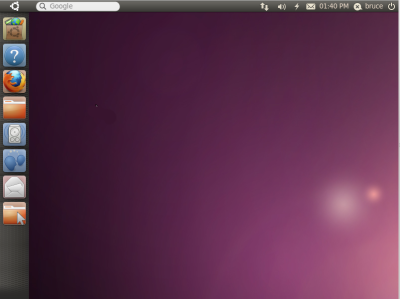
I hate Unity!
Other problems besides Unity that I need to complain about are
- I can't easily adjust the mouse scroll speed
- Flash often fails. This is crucial since I watch
mostall of my TV online. - No Netflix support!
- No Google Earth Plugin!
- Issues with dual monitors.
- Unity and the top panel have dissappeared on my dual boot work computer, I'm not sure why and I have no idea how to fix it!
- Random problems such as the Print Screen button not working.
Maybe I will switch back to Ubuntu, maybe they will get rid of Unity, or maybe I will do everything on my Chromebook.
Sunday, 6 November 2011
Chromebook: Initial Thoughts
Part 1 to this post was "Chromebook: Will I Buy One?," and yes, I did buy one and so far I love it.
To begin with, how did I buy a Chromebook? I live in Canada and they are not released up here yet. I checked Amazon and Best Buy and neither would ship to Canada so I did some browsing at eBay. After about 2 weeks of searching/following, I bought a Samsung Series 5 3G for ~$350 with shipping; thank you high Canadian Dollar (it has since lowered). Within 10 days it arrived in an oversized boxed filled with camoflauge paper packing.

Next, how was the setup process? It was extremely easy! It took less than 10 minutes, I entered my language, connected to the wireless network in my apartment, did a system update, signed into my Google Account and bam, done! Since most of my information is synced, all of my apps, extensions, form information, bookmarks, and theme(s) were present.

What is it like without a desktop? Initially it felt alien, after the first few hours I realized that the Chrome New Tab page is an excellent replacement for the desktop. In general, computer users are spending more time solely in the browser and the need for a desktop is disappearing.
After using the Chromebook for about 4 weeks, I have discovered how important battery life is to me. I am getting ~9 hrs on one charge! Other aspects of the Chromebook that I absolutely love is the weight, chicklet style keyboard, rarely hearing the fan kick in, anti-glare screen, and the fact that the bottom of the Chromebook never feels hot, just warm. I also like the simple folder system and reduced system options which makes finding things extremely easy. I am currently on the developer channel and since the start of this post I have been getting weekly updates; there is now an offline photo editor, offline Gmail, Netflix support, and offline Google Docs (view only); Google realized that the world is not completely online....yet.


On the negative side, sometimes the Chromebook does feel underpowered, there is no Google Earth plugin,certain sites render extremely slow, and I miss having the Home and End keys.
In summary, if you have $500, do most of your work in the cloud, and regret buying that tablet which is impossible to type with, treat yourself to a Chromebook, it is the future!
Note: As you may have guessed, this post was written with a Chromebook.

To begin with, how did I buy a Chromebook? I live in Canada and they are not released up here yet. I checked Amazon and Best Buy and neither would ship to Canada so I did some browsing at eBay. After about 2 weeks of searching/following, I bought a Samsung Series 5 3G for ~$350 with shipping; thank you high Canadian Dollar (it has since lowered). Within 10 days it arrived in an oversized boxed filled with camoflauge paper packing.

I love my Chromebook...and my Ikea table
Next, how was the setup process? It was extremely easy! It took less than 10 minutes, I entered my language, connected to the wireless network in my apartment, did a system update, signed into my Google Account and bam, done! Since most of my information is synced, all of my apps, extensions, form information, bookmarks, and theme(s) were present.

The Browser is the Desktop...
After using the Chromebook for about 4 weeks, I have discovered how important battery life is to me. I am getting ~9 hrs on one charge! Other aspects of the Chromebook that I absolutely love is the weight, chicklet style keyboard, rarely hearing the fan kick in, anti-glare screen, and the fact that the bottom of the Chromebook never feels hot, just warm. I also like the simple folder system and reduced system options which makes finding things extremely easy. I am currently on the developer channel and since the start of this post I have been getting weekly updates; there is now an offline photo editor, offline Gmail, Netflix support, and offline Google Docs (view only); Google realized that the world is not completely online....yet.

The Worlds Simplest Photo Editor

The Worlds Simplest File System
On the negative side, sometimes the Chromebook does feel underpowered, there is no Google Earth plugin,
In summary, if you have $500, do most of your work in the cloud, and regret buying that tablet which is impossible to type with, treat yourself to a Chromebook, it is the future!
Note: As you may have guessed, this post was written with a Chromebook.
Sunday, 30 October 2011
Original Content Coming to YouTube
For all of you cable-cutting people out there, rejoice the the following news: original content (aka online tv channels) are coming to YouTube. The list can be found here, and includes some big names like Ashton Kutcher (Two and a Half Men is so much funnier these days), Shaq, Tony Hawk, and Jay-Z. The "channels" are expected to hit YouTube next month and more will be added over the next year. This should make Google TV more appealing and persuade more people to ditch the cable TV bill. Die cable TV Die!
Saturday, 29 October 2011
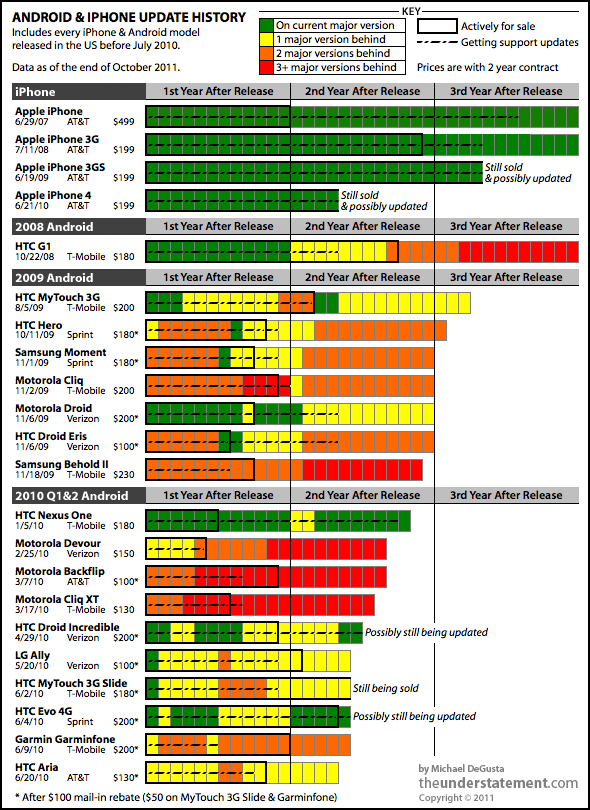
Android Fragmentation: It's an Ugly Picture
Technically it's not a picture, it's a chart and a great one created by Michael DeGusta at his Tumblr blog: The Understatement. The basic color rules apply here: green is good and red is bad. As you can see from a quick glance at the chart, Android users have a lot more red than iPhone's green :( Check out Michael's analysis for more details.

Wednesday, 26 October 2011
Google Earth Flight Simulator
They say that everyday you learn something new, today I discovered the Google Earth Flight Simulator created by Xavier Tassin. The simulator uses the Google Earth Plugin (sorry Linux and Chromebook users) which means that it's all done online....awesome! There are 10 aircraft to choose from, real time local weather conditions, chat, and many great animations. Check out the video below to see it in action:
Sunday, 11 September 2011
Canadian Downloaders Beware

Life has been pretty good for illegal downloaders up here in the great white north, but the times are a changing. Voltage Pictures LLC, which owns the copyright to the film The Hurt Locker has sued thousands of downlaoders in the USA. Voltage used the Montreal-based IP law firm Goudreau Gage Dubuc to force three Canadian ISPs - Bell Canada, Cogeco Cable, and Videotron to hand over subscriber account details. These people will probably be sent letters insisting they pay thousands of dollars for copyright violations. I miss the good ol' days :(
Tuesday, 14 June 2011
Browser Blast From The Past
Yesterday a coworker found and booted up an extremely old laptop. Here, it all its beauty, is Netscape 1.0. It's definitely light years away from today's browsers. Enjoy!

Friday, 27 May 2011
Desmos: Collaborative Educational Whiteboard
Techcrunch Disrupt happened this past weekend and one of the great startups that showcased their product was Desmos, a free online collaborative tool that's focused on the education sector. I signed up and tried out their web app (offline program also available), the editor is quite good (lots of options), the app is very intuitive and educators can collaborate on a whiteboard (file) in real time. Apps like these are badly needed in the educational world to stop the fragmentation associated with new technology. I will definitely be giving this a try for the Fall 2011 semester. Long-live the cloud!

Tuesday, 24 May 2011
Life Without Windows: 8 Weeks and Counting

Initially I had planned on splitting my computer usage 50:50 between Windows and Ubuntu, it's actually worked out to 99% Ubuntu and 1% Windows (I haven't been in Windows for at least 2 weeks). The switch has been so good that I also changed my work computer and teaching computer to dual boot machines. What am I enjoying about it so far?
- No antivirus: Not having this has been great. No more do I have to deal with virus updates or scanning.
- Ubuntu is better at updates: Approximately 2-3 days of the week Ubuntu has to be updated. This may seem like a lot but very rarely does it have to be restarted.
- Great free software: I have not been in a situation where free software can't get the job done. I use Libreoffice for "office-like" work, Inkscape for vector editing, Picasa for photo editing, and Dropbox for file sharing.
- Fantastic customization: With compizconfig, basically everything (desktop icons can be different sizes!) can be customized.
- Easy on System Resources: Currently I have Chrome, Google Earth, and Libreoffice open, and I am only using 700 MB or RAM, Windows 7 uses over 2 GB.
- It's Free!: If I want to upgrade Windows, it's going to cost be anywhere between $200-$300, with Ubuntu it's free and occurs every 6 months. Also, these upgrades take about 1 hr and do not require clean installs.

The only negative thing I have encountered is the lack of Netflix support, I use the Wii for this but the video quality is low. Hopefully Chrome will get this support at the same time that Chrome OS does.
So far it has been an excellent 2 months as a part of the Linux world. The learning curve has not been steep, and with the Unity interface, the switch to Ubuntu is even easier. If you haven't tried it yet, give it a shot, you may become hooked!
Saturday, 14 May 2011
Chromebook: Will I Buy One?
The Chromebook - Google's version of a notebook that uses the browser as the OS. There is no desktop, no antivirus, no installation of software (web apps), and no annoyingly-long boot times. All of this sounds great, but what if I do need an offline app? As an example, Google Docs works great, but sometimes I need that bit of extra formatting (merging rows in a table) and this is only found in offline office suites such as LibreOffice. Also, computer intensive tasks requiring photo and video editing can be done online, but it's extremely slow and limited (editing photos in Picknik).
Currently, I think the Chromebook will work as a great secondary device. It is built for the web, and it does a great job with it. It will eventually fall into the primary device category, the web hasn't evolved enough to put it there yet.
So my answer to the title of this post is .....maybe.
Currently, I think the Chromebook will work as a great secondary device. It is built for the web, and it does a great job with it. It will eventually fall into the primary device category, the web hasn't evolved enough to put it there yet.
So my answer to the title of this post is .....maybe.
Friday, 13 May 2011
Livestreaming Bald Eagles: I love the Web
Here's another reason I love the web: a continuous livestream of a bald eagle nest. With over 100 million views, this is the most watched live streams ever, take that Royal Wedding!
Free live streaming by Ustream
Free live streaming by Ustream
Subscribe to:
Posts (Atom)
