Pages

Tuesday, 23 February 2010

Zoho Allows Sign-in With Facebook Connect

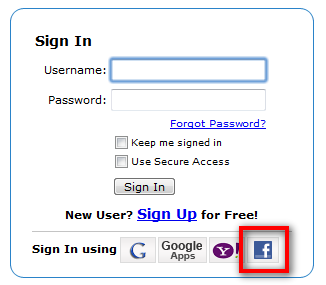
Zoho is very open with sign-in options by allowing users to sign in with Google, Google Apps, or Yahoo accounts. Today they announced the biggie that users can sign-in to any of the Zoho apps with Facebook credentials. 
Users can also share documents with all of their Facebook friends (even those without Zoho accounts) and your zoho/facebook accounts can be linked. 


Zoho is making it so easy to use their product and this will definitely cause a huge increase in their numbers. This is truly a great feature and is a big leap forward towards an open web. Great work Team Zoho. 

Zoho Writer Gets Page View For Editing

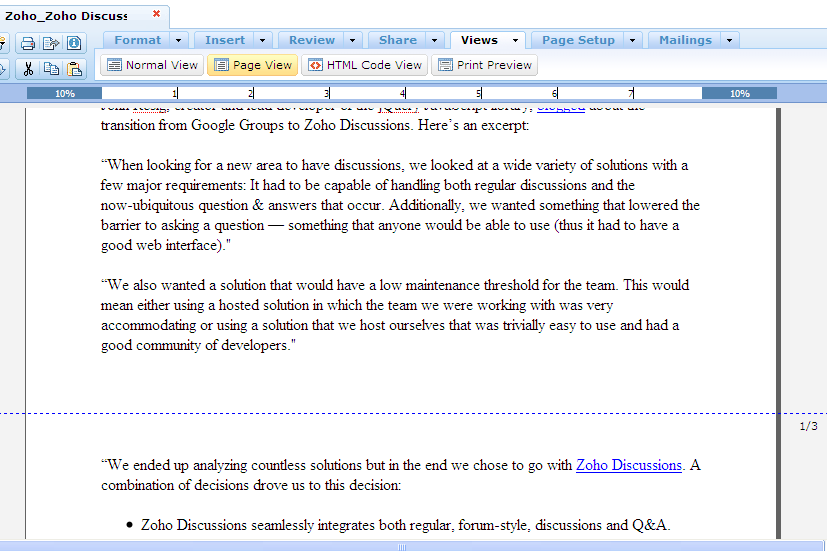
One of the basic features of desktop word processors that wasn't present in their online counterparts was page view. Page preview was available, but this would only preview the document for printing, editing could not occur. Zoho Docs now has an editable page preview (View --> Page View) that indicates page separations with a dashed line. Its a simple solution that works great.


Monday, 22 February 2010

Zoho Mobile Gets Refresehed On iPhone and Android


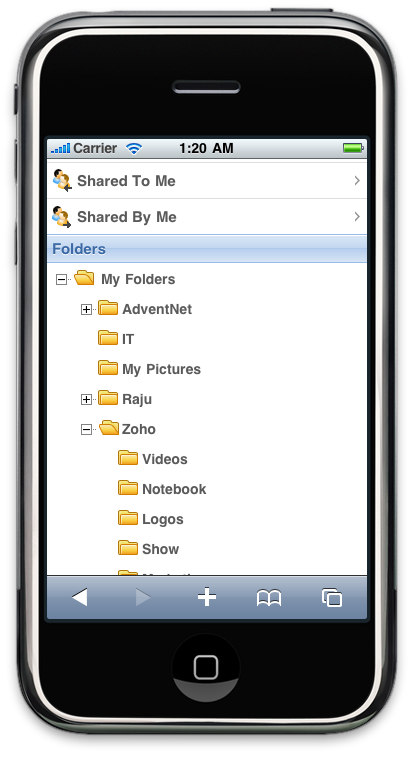
Zoho mobile's app for android and iPhone was updated today to allow sign-in with Google, Google Apps, and Yahoo accounts (the desktop version already had this) along with a redesigned home screen, the introduction of mobile Zoho Docs that is limited to viewing documents, and some performance tweaks. All of these are great improvements, but editing of any type of mobile document would have been a game changer. I have been expecting this feature from the Google Docs team but it hasn't arrived yet. Whoever (Zoho, Google, or Microsoft) introduces this feature first will definitely cause a spike in their number of users along with a drastic change in how we use our smartphones. 

The New Mobile Zoho

Saturday, 20 February 2010

Goodbye Google Gears

Google Gears, the offline sync tool, is being pushed out the door to make way for the offline capabilities of HTML 5. This is a great move  because all of these plugins have some sort of browser-specific bug. For example, using Chrome I could not view drawings in presentation mode with Google Presentations because of a conflict with Google Gears, I could see them in FireFox. As we get rid of these plugins, developers can spend more time of evolving the the web as a whole and lest time on bug fixing.

RIP Google Gears.


Google Docs Gets A New Clipboard

Recently, Microsoft posted a series of videos touting its advanced copy/paste feature compared to Google Docs. Now Google Docs has answered back with a new and improved copy/pasting that uses a web clipboard to store copied items "in the cloud" for 30 days. Prior to the introduction of this feature, Google Docs had simple copy and pasting and worked quite well for placing information from websites into a document, but not so well for copying information between Google documents, spreadsheets, and presentations. As shown in the photos below, spreadsheet data can be copied and pasted into a presentation as a table.


There are problems with this feature though. I tried copying images from a Google document into a presentation and vice versa, it simply wouldn't work, and the feature is very browser dependent (guess which one it works best in?). Also, the fact that clipboard storage only works for Google Docs and not other websites is a major let-down. Hopefully they will keep improving this feature. 

Friday, 19 February 2010

Is Microsoft Feeling Threated by Google Apps?

I came across these videos by the Microsoft team promoting their Office suite vs. Google Apps. They compare the desktop version of Office with the web-only Google Docs (we'll have to wait and see what the web-version of Office will be like). They make the expected points that Google Docs has limited options and that formatting is lost when converted to Office documents. Interesting enough, Microsoft shows the limited copy and paste option in Google Docs , this has already been updated and vastly improved by the Docs team. Another interesting point, these pro-Microsoft-anti-Google videos are hosted on Google's service, YouTube. 


I think that Microsoft is really worried about the Google Apps suite and they should be; there are currently 2 million businesses worldwide that have gone Google along with 7 million students, faculty, and staff. Most of my work is done in the cloud (like this blog posting) and although the formatting is limited compared with desktop applications, the advantages of collaboration, access from anywhere, and ease of publishing to the web are very strong. I love the cloud!!


Uncool Microsoft Videos


Cool Google Apps Video

Thursday, 11 February 2010

Create Panoramics Easily With AutoStitch

To begin with, I love Picasa, the great photo organizing, editing, and sharing (much easier than sharing through Windows) program. So, I love taking photos but I am far from an expert; most of my photos are people-free, and if you take a glance through my Picasa Web Albums ( like this one) you'll see lots of outsidey-naturey-scenery shots. Recently I became interested in creating panoramic photos, this lead to the discovery that Picasa can create panoramics but it's through the collage tool which is really time consuming and results are poor. After visiting one of my favorite sites, Lifehacker, I gave  AutoStitch a try. This is a simple, free program that is very easy to use and does a great job at stitching photos together. The saying goes that a picture is worth a thousand words, well the following three photos are worth 3000 words. Not much else to say about this program, it works great and is extremely easy to use. 

Before

and after
Powered By Blogger