Techcrunch Disrupt happened this past weekend and one of the great startups that showcased their product was Desmos, a free online collaborative tool that's focused on the education sector. I signed up and tried out their web app (offline program also available), the editor is quite good (lots of options), the app is very intuitive and educators can collaborate on a whiteboard (file) in real time. Apps like these are badly needed in the educational world to stop the fragmentation associated with new technology. I will definitely be giving this a try for the Fall 2011 semester. Long-live the cloud!
Friday, 27 May 2011
Tuesday, 24 May 2011
Life Without Windows: 8 Weeks and Counting
In the past I have dabbled with Ubuntu, 2 months ago I made a more dedicated commitment; transforming my 1.5 yr old Windows 7 laptop into a dual-booting Ubuntu beast. The process was quite easy; download the image, burn it to a disk, restart windows with the disc inserted, and after about 30 minutes and a few clicks, Ubuntu is installed.
Initially I had planned on splitting my computer usage 50:50 between Windows and Ubuntu, it's actually worked out to 99% Ubuntu and 1% Windows (I haven't been in Windows for at least 2 weeks). The switch has been so good that I also changed my work computer and teaching computer to dual boot machines. What am I enjoying about it so far?
The only negative thing I have encountered is the lack of Netflix support, I use the Wii for this but the video quality is low. Hopefully Chrome will get this support at the same time that Chrome OS does.
So far it has been an excellent 2 months as a part of the Linux world. The learning curve has not been steep, and with the Unity interface, the switch to Ubuntu is even easier. If you haven't tried it yet, give it a shot, you may become hooked!
Initially I had planned on splitting my computer usage 50:50 between Windows and Ubuntu, it's actually worked out to 99% Ubuntu and 1% Windows (I haven't been in Windows for at least 2 weeks). The switch has been so good that I also changed my work computer and teaching computer to dual boot machines. What am I enjoying about it so far?
- No antivirus: Not having this has been great. No more do I have to deal with virus updates or scanning.
- Ubuntu is better at updates: Approximately 2-3 days of the week Ubuntu has to be updated. This may seem like a lot but very rarely does it have to be restarted.
- Great free software: I have not been in a situation where free software can't get the job done. I use Libreoffice for "office-like" work, Inkscape for vector editing, Picasa for photo editing, and Dropbox for file sharing.
- Fantastic customization: With compizconfig, basically everything (desktop icons can be different sizes!) can be customized.
- Easy on System Resources: Currently I have Chrome, Google Earth, and Libreoffice open, and I am only using 700 MB or RAM, Windows 7 uses over 2 GB.
- It's Free!: If I want to upgrade Windows, it's going to cost be anywhere between $200-$300, with Ubuntu it's free and occurs every 6 months. Also, these upgrades take about 1 hr and do not require clean installs.
The only negative thing I have encountered is the lack of Netflix support, I use the Wii for this but the video quality is low. Hopefully Chrome will get this support at the same time that Chrome OS does.
So far it has been an excellent 2 months as a part of the Linux world. The learning curve has not been steep, and with the Unity interface, the switch to Ubuntu is even easier. If you haven't tried it yet, give it a shot, you may become hooked!
Saturday, 14 May 2011
Chromebook: Will I Buy One?
The Chromebook - Google's version of a notebook that uses the browser as the OS. There is no desktop, no antivirus, no installation of software (web apps), and no annoyingly-long boot times. All of this sounds great, but what if I do need an offline app? As an example, Google Docs works great, but sometimes I need that bit of extra formatting (merging rows in a table) and this is only found in offline office suites such as LibreOffice. Also, computer intensive tasks requiring photo and video editing can be done online, but it's extremely slow and limited (editing photos in Picknik).
Currently, I think the Chromebook will work as a great secondary device. It is built for the web, and it does a great job with it. It will eventually fall into the primary device category, the web hasn't evolved enough to put it there yet.
So my answer to the title of this post is .....maybe.
Currently, I think the Chromebook will work as a great secondary device. It is built for the web, and it does a great job with it. It will eventually fall into the primary device category, the web hasn't evolved enough to put it there yet.
So my answer to the title of this post is .....maybe.
Friday, 13 May 2011
Livestreaming Bald Eagles: I love the Web
Here's another reason I love the web: a continuous livestream of a bald eagle nest. With over 100 million views, this is the most watched live streams ever, take that Royal Wedding!
Free live streaming by Ustream
Friday, 25 February 2011
Cable TV: I don't Miss You
The change was different but not difficult. I purchased a VGA-audio cable on ebay (computer cables are much cheaper here than in brick and mortar stores) and then easily set up my Windows 7 machine for dual monitor. For the first 2 weeks I would think, "hmm, it would be so nice to channel surf." Those thoughts disappeared and were replaced with "Cable TV really does have a lot of commercials" and "I love being able to watch my show whenever I want" and "downloading TV shows is great!" Currently my "channels" are simply bookmarks in my browser which I can access from any computer since I use Google Chrome Sync; for background TV I put on something from Justin.tv, and I also pay for a Netflix subscription ($7.99/month and the selection is getting much better). For the most part I can watch anything that I want online that I want, the exception are Sports highlight shows (no problem to find individual highlights) and high quality sporting events.
To sum up, I am really enjoying the freedom from cable TV and the $50/month in savings. To everyone out there with a TV subscription, "Cut The Cable!"
Friday, 27 August 2010
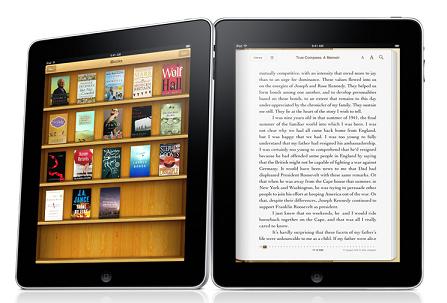
Why I'm Not Buying An Ipad
To start with, I think that Apple makes great products, but they are a bit beyond my price range. If I did have lots of money, I still probably wouldn't buy an iPad, here's why.
First of all, there are no USB ports. For a device with a maximum storage capacity of 64 GB (for $749 or $879 !!), file transfers are a necessity. I think it's totally ridiculous that there's not at least 1 USB port, and if you want one, you have to pay $35 for an adapter. iTunes can be used for transfers, but it's terribly slow. Second, I like buttons. I own an iPod touch, which works great, and has some excellent features, but playing games on it is brutal (with the exception of games involving a lot of tilting). I can't imagine typing long documents on an iPad, it would be finger-cramp hell. Third, lightweight netbooks/notebooks that can do more and come with better specs can be bought for less than $500, why would I spend money on something that's more expensive and can do less? Fourth, there's no camera(s). Finally, I really hate how slow iTunes works on windows, I want to keep my iTunes time to a minimum.
Apple releases great products, for me this isn't one of them.
Thursday, 17 June 2010
The New Hotmail
Since the release of Gmail, Hotmail has felt dated and sluggish; with this new update we can say this no more. I won't go into the fine details of the update, but here are the best new features:
- Sweep: This allows you to delete all messages from 1 sender and to continue doing this in the future.
- 10 GB Attachments: Wowzers!! These are tied into your Skydrive account and for any photos, they appear as a slideshow within the account.
- Content Within Emails: YouTube links appear as videos that can be played within the email and flickr links as slideshows.
- Tracking Numbers: Hotmail will automatically recognize a tracking ID and give you all of the information within the email.
- Office Integration: Simply put, it does an awesome job at working with Microsoft Office documents.
The new update also makes Hotmail feel snappier. For a comparison of Gmail with Hotmail, head on over to Lifehacker.
Photos in the new Hotmail
Subscribe to:
Posts (Atom)