GDrive is here...well kind of. Within the next two weeks, Google Docs users will be able to upload any type of file, up to 250 MB, to Google Docs. Storage is limited to 1 GB with additional storage costing $0.25 GB/year. Note that Google documents, presentations, or spreadsheets do not count towards this storage. All of these files will be searchable, sharable, and many viewable with the Google Docs viewer.
The 1 GB storage limit is low considering that Dropbox offers 2 GB, Windows Skydrive users gives 25 GB for free and Gmail is 7.4 GB and increasing. As an interesting note, just yesterday the Windlows Live Team blogged about their high storage limit, did they know about the GDrive announcement in advance? The big advantage that Google Docs has over the other online "drives" is that it can do more than act as a storage location; documents, presentations, and spreadsheets can be created and other file types viewed. Also, the extra storage rate for the GDrive is cheap, for the price of 1 coffee/year, users can have 7 GB of storage, and for a Big Mac Meal per year, 25 GB.
The GDrive is definitely going to be a hit with current Google Docs users, although I'm not sure how many new people this feature will attract. Expect to see many more of these Desktop meets Web announcements in the coming year as Google preps for the Chrome OS.
Important Note: I'm going to post photos whenever this is activated for my account:
Tuesday, 12 January 2010


Tuesday, 5 January 2010
Google Docs Presentations Co-Editing Gets Updated
Today I discovered something that I apparently missed (I've spent too much time reading about Nexus), real-time indication of editing in Google Presentations. Prior to this, editing a presentation with a friend was brutal because there was no indication of what was being edited. Now, when a slide element (i.e., image, text) is being edited, it will be highlighted and the username will also appear. This makes collaborative life much easier.


Friday, 11 December 2009
Goodbye Landline

Thursday, 10 December 2009
Zoho Adds A Chrome Extension
As you probably already hear, Google Chrome now has extensions (along with Linux and Mac versions). Zoho (who are definitely Google-likers) has added two great extensions.
- Zoho Companion: This allows you to be connected to Zoho all of the time while using Chrome. You can open documents, spreadsheets, presentations, and pdfs directly within Zoho. So, if you come across something like below:
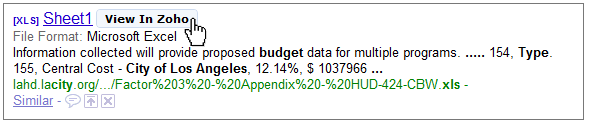
all you have to do is click on View in Zoho. This is going to be such a timesaver, there is no longer any downloading of the file and waiting for the slow-clunky Excel program to open. Simply click on the link and you have access to the spreadsheet, even if you don't have a copy of excel on your computer! The companion also allows tracking of shared documents and emails.
- Zoho Notebook Companion: This extension allows you to take clippings, screenshots, and write notes about webpages.
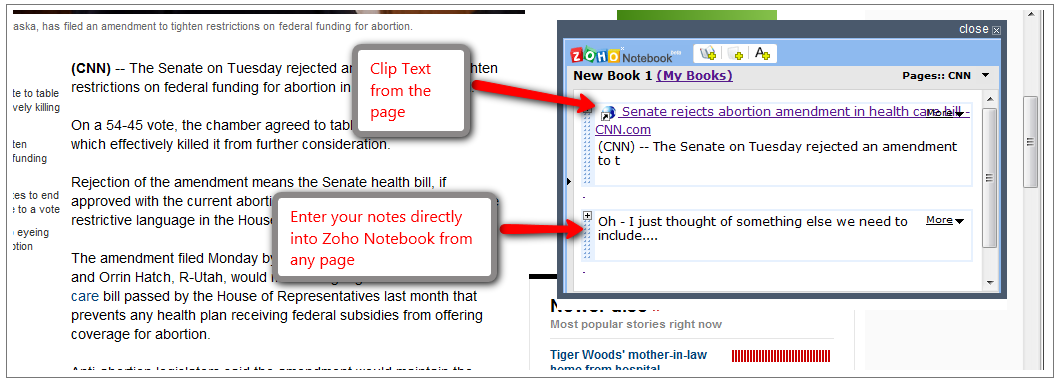
Google has been criticized somewhat for developing an OS that is completely cloud-based, extensions like these display the power of the cloud and that users don't need to be locked into a desktop. Check out the video below of the Chrome OS and note how similar the file opening is to Zoho's Companion extension:
Wednesday, 9 December 2009
Export All Of Those Google Docs At Once
If your afraid of loosing those valuable docs that are stored in the cloud, fear no more!! Google Docs now allows the exporting of all of your documents with a single click (up to 2 GB at a time), that's a lot of Google Docs files. This is a great feature that I will use occasionally. I have no real fears of loosing my online documents but its always nice to have a backup. Along with this addition, searching within GDocs was upgraded to include sorting by relevance, and a more flexible search terms (searching for "game spot" will also return results for "gamespot").


Sunday, 6 December 2009
It's Been A Successful Online-Office Semester
It's been a busy semester in the cloud, it's been 6 weeks since my last post!! Anyways, this semester went very well. I used Google Sites for the course webpage, this allowed me to easily post presentations, documents, videos, and important announcements. We experimented with Web 2.0 lab reports using Zoho Docs, there was some frustrations with this but this will occur when any new software is introduced. The students were amazed with the real-time collaboration, the fact that it's free, and how it can be accessed from anywhere. It took a while for them to realize that nothing is stored on the computer and some of them tried to "send it as an attachment." Lab marks were posted via a Google Spreadsheet embedded into the course webpage. This allowed students to view their marks as soon as they were entered, this was a great hit and worked much better than constantly posting .pdfs. It truly was a great semester and I expect to do all of the above plus more in the upcoming Winter semester.
Wednesday, 21 October 2009
Preview of Office Web Apps Expanding
Yesterday Microsoft announced that they will expand the technical preview of Office Web Apps. This is great news if your in the US or Japan, everyone else (like myself) will have to wait until (hoepfully) sometime later this fall. For US and Japan citizens, you can sign up here for a technical preview:
http://skydrive.live.com/acceptpreview.aspx/.documents?aobrp=browse

http://skydrive.live.com/acceptpreview.aspx/.documents?aobrp=browse

Subscribe to:
Posts (Atom)
